In the first part of this tutorial series , I’ll start explaining how to write a simple android plugin for Unity .Lets start with a simple class that you can log things to Eclipse DDMS tool . I assume that you have already installed Eclipse and Android tools, you don’t actually need Android tools to write this plugin but to view logs easy without messing up with console you may need Eclipse. What we need to do for this plugin is ;
- First write a java class from Eclipse or any other text editor you like(It’ s more convenient that you start writing your class from Eclipse because you can keep track of your project easly, besides in the future I’ ll show you how to make plugins with Unity’ s new export option “Google Android Project”)’
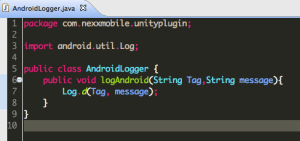
- From eclipse or the command line tool export this class as a jar file. Then put this jar file into your Plugins – Android folder (if you don’t have one make those folders )
- Now let’ s use our plugin. First create a C# script in the plugins folder. Name it whatever you want, I named mine as AndroidHelperClass.
- We can access the java class file by using Unity’s AndroidJava Object class. It takes a string( your package name) “com.yourpackagename.yourjavaclass” as parameter. After making instance of your androidjavaobject just use “Call” method or if your java class is static use “CallStatic” method to call your java class.( androidjavaobject.Call (” Your Java method name “, ” args [ ]”) )


- It’s time to test our new log tool now. Create a new C# script to test. Just call logAndroid method and check out your Eclipse ‘ s logCat.

For more great tutorials please join the poll


 nevzatarman
Leave a comment